The Fire TV Stick is the most common way Americans watch IPTV, and it is also the one device on this list where setup involves a genuine workaround. Amazon does not carry most IPTV players in its Appstore, so you install the app yourself with a free tool called Downloader. Amazon allows this - the setting exists for exactly that purpose - but the menus that unlock it are buried, and they moved in a 2022 Fire OS update, which is why half the guides you find online point at screens that no longer exist.
This guide follows the current menu layout step by step, with an illustration of each screen so you know you are in the right place. Budget about five minutes for the sideload and another two to sign in.
You will need working credentials before the final step. If you have not subscribed yet, the 24-hour free trial issues the same username, password and server URL a paying subscriber gets, so you can complete this entire guide on the trial and decide afterwards.
Why the Firestick is the default IPTV device
Sideloading is the reason. Fire OS is Android underneath, which means it runs the whole ecosystem of Android IPTV players - not just the handful Amazon lists. Combined with a price between $30 and $60 and an HDMI form factor that hides behind the TV, it turned the Stick into the default cord-cutting device in the US, and Amazon has sold well over 200 million Fire TV devices worldwide on the back of that.
The trade-off is storage and memory. A Stick ships with 8 GB of storage, much of it taken by the system, and enough RAM for exactly one thing at a time. That is why this guide has you delete installer files as you go and why the cache-clearing habit in the tips section is worth building.
One naming note before you start: Downloader, the tool used here, is a legitimate app distributed through Amazon's own Appstore and maintained by AFTVnews. It is not a piracy tool - it is a browser that can save files, which Amazon's store rules otherwise prevent.
What you need before you start
- A Fire TV Stick from 2018 or newer - the 4K Max is the pick if you plan on 4K streams
- Your welcome email with username, password and M3U or server URL
- The free Downloader app by AFTVnews (installed in step 4)
- Your Amazon account signed in on the Stick, as the Appstore requires it
- About five minutes, and ideally an Ethernet adapter for game days
No credentials yet? Get them with a 24-hour free trial or a plan from $15 on the pricing page.
Step-by-step: Fire TV Stick
- 1
Open Settings and select My Fire TV
From the Fire TV home screen, scroll right to the gear icon and open Settings, then choose My Fire TV. On remotes from before 2020 this menu is sometimes labelled Device & Software. Everything in this guide happens inside this one menu tree, so it is worth remembering where it lives.
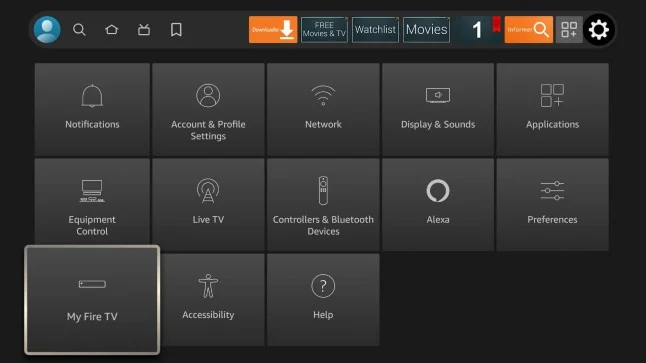
Fire TV Settings screen with My Fire TV selected - 2
Unlock Developer Options if it is hidden
Since a 2022 Fire OS update, Developer Options is hidden on new devices. Open About, highlight your device name, and press the select button on the remote seven times. A small toast confirms you are now a developer. If Developer Options is already visible under My Fire TV, Amazon unhid it for your model and you can skip this.
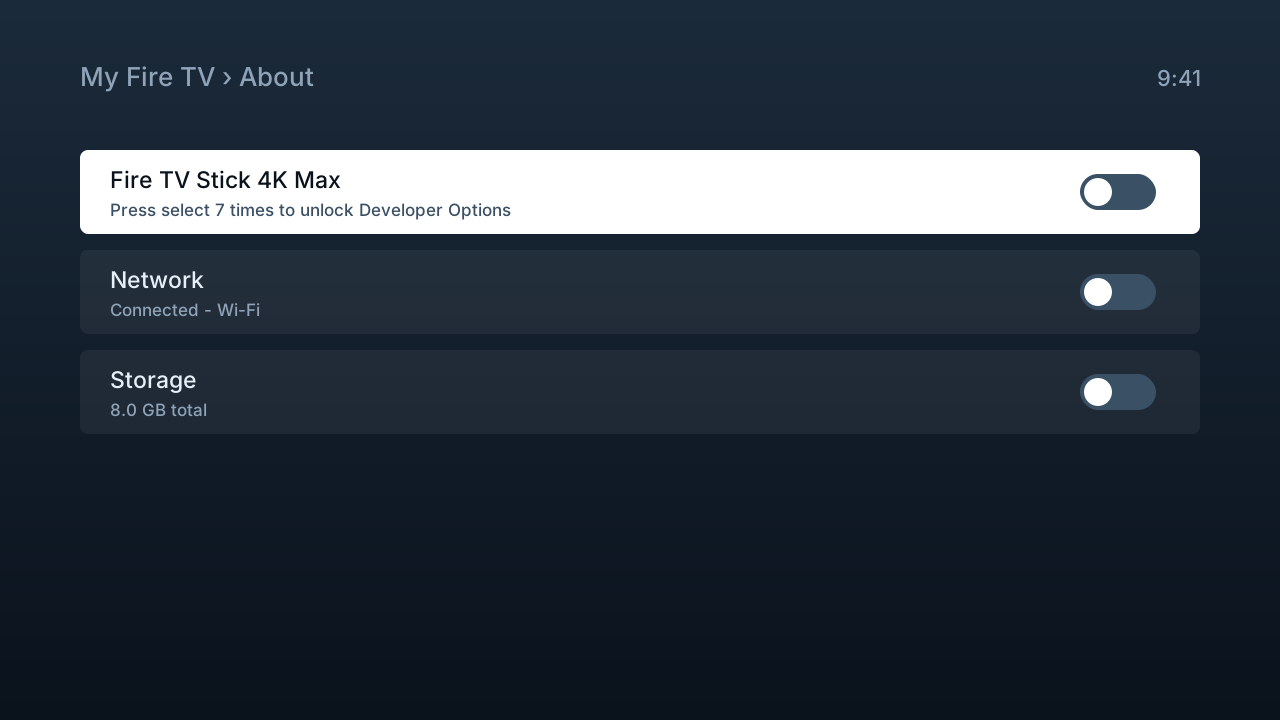
Diagram: the About screen where pressing the device name unlocks Developer Options - 3
Turn on Install unknown apps
Open Developer Options and select Install unknown apps. This is the supervised gate Amazon provides for loading apps from outside its store. It does not void the warranty, it does not root the device, and you can switch it back off once the player is installed.
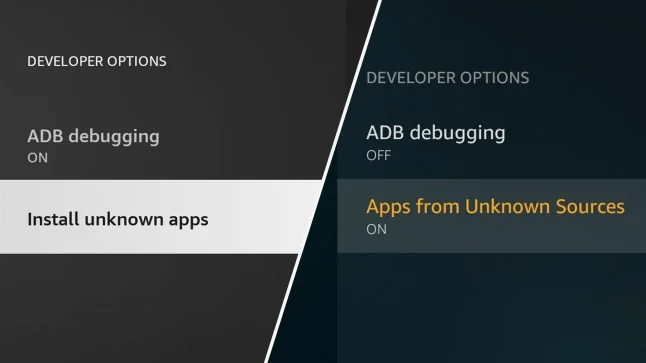
Fire TV Developer Options showing ADB debugging and Install unknown apps - 4
Install Downloader from the Appstore
Head back to the home screen, open search, and type Downloader. Install the orange app by AFTVnews - it is free and has been the standard Fire TV sideloading tool for the best part of a decade. Beware of imitations with similar icons; the real one lists AFTVnews as the developer.
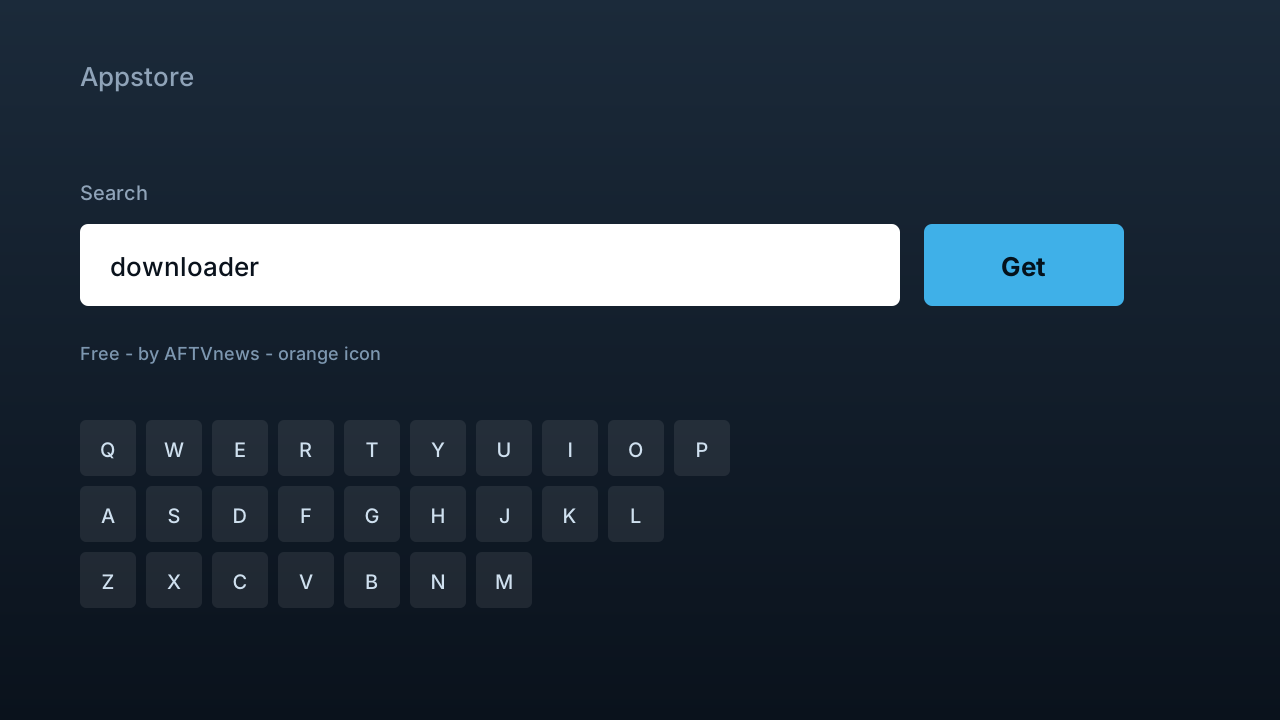
Diagram: searching the Amazon Appstore for the free Downloader app - 5
Enable Downloader in the unknown apps list
Return to Settings, My Fire TV, Developer Options, Install unknown apps, and flip the toggle next to Downloader to ON. The permission is granted per app, not globally - miss this and the install in step 7 fails without a useful error message.
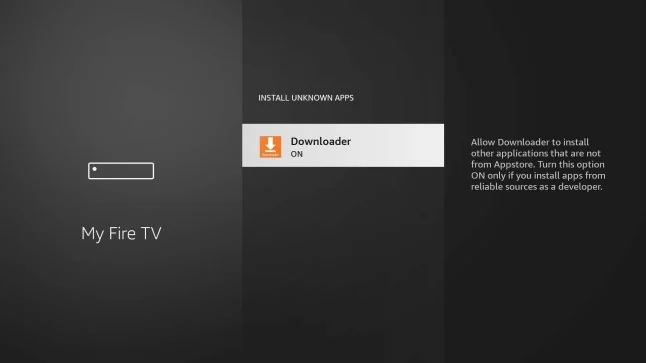
Fire TV Install unknown apps screen with Downloader switched on - 6
Enter the code from your welcome email
Open Downloader and type the short code from your welcome email into the URL field, then press Go. The player APK downloads in a few seconds. Codes are case-sensitive and occasionally rotated for security, so copy the newest email rather than an old note.
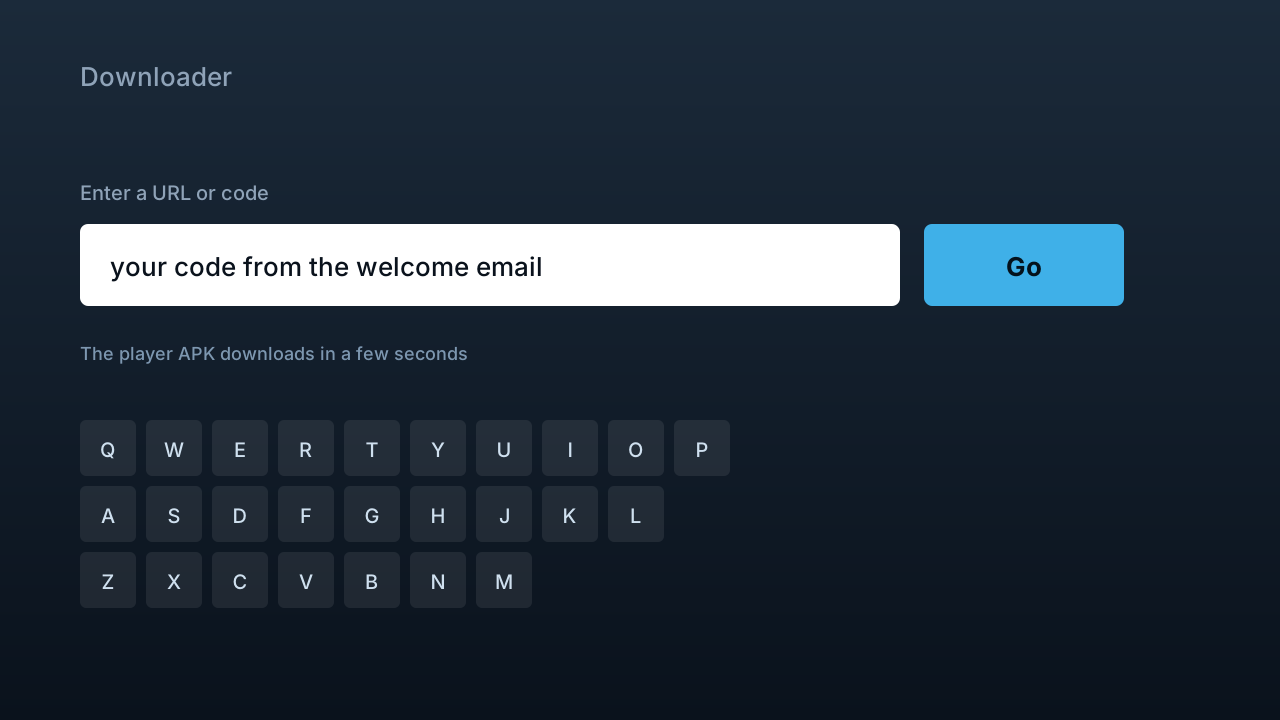
Diagram: the Downloader URL field where the welcome-email code is entered - 7
Install the app, then delete the installer
When the download completes, choose Install, then Open. Downloader will offer to delete the APK file afterwards - accept. Sticks have little free storage, and orphaned installer files are the usual reason a later app update refuses to fit.
- 8
Sign in and let the guide load
Enter the username, password and server URL from your email. The channel list appears immediately; the full EPG takes about a minute to download the first time. After that it refreshes in the background and you have a normal guide with catch-up on supported channels.
Fire TV models and what they handle
| Model | Years | Best for | Verdict |
|---|---|---|---|
| Fire TV Stick Lite / HD | 2020-2026 | 1080p feeds | Fine for HD, skips frames on 4K |
| Fire TV Stick (3rd gen) | 2020-2023 | 1080p feeds | Solid HD workhorse |
| Fire TV Stick 4K | 2018-2026 | 4K feeds | The value pick for 4K |
| Fire TV Stick 4K Max | 2021-2026 | 4K + Wi-Fi 6 | Best Stick for live sport |
| Fire TV Cube | 2019-2026 | 4K + Ethernet built in | Fastest, and wired out of the box |
Tips that save time
Wire it for game day
An Ethernet adapter for the Stick costs about $15 and removes more live-sport stutter than any setting inside any app. Wi-Fi congestion at kickoff - everyone in the neighbourhood streaming at once - is the single most common cause of buffering complaints we see.
Match the Stick to the stream
A 4K Max handles 4K feeds comfortably. The HD Sticks are fine at 1080p but drop frames on 4K sources, and every 4K channel in the lineup also has an HD feed - so an older Stick is a reason to pick the HD feed, not to buy new hardware.
Clear cache monthly
Settings, Applications, Manage Installed Applications, your player, Clear cache. Thirty seconds, and it prevents the slow-creep sluggishness that usually gets blamed on the service rather than the device.
Common mistakes to avoid
Skipping the per-app toggle
Turning on Install unknown apps globally in Developer Options is not enough on current Fire OS - Downloader itself must be enabled in the per-app list. This one omission produces most failed first installs.
Typing the code from memory
Codes are case-sensitive. Read it from the welcome email each time; a capital I and a lowercase l are indistinguishable in most fonts, and Downloader will just say not found.
Leaving old APKs on the Stick
Every leftover installer eats storage a Stick does not have. Delete them in Downloader's Files menu after each install - future updates will thank you.
Testing speed on a phone
Your phone on the couch and the Stick behind a TV panel see different networks. Install Speedtest on the Stick itself before concluding anything about buffering.
If something isn't working
The code will not download anything
+
Re-copy the code from the most recent email rather than retyping it, and check for a trailing space in the URL field. Codes rotate occasionally; if it still fails, live chat can read you the current one in under a minute.
It says App not installed
+
Storage, almost every time. Delete old APKs in Downloader's Files menu, uninstall an app you never use, restart the Stick, and run the install again.
The install button never appears
+
The per-app permission is missing. Settings, My Fire TV, Developer Options, Install unknown apps - Downloader must be ON. This is step 5, and it is the most skipped step in the guide.
The stream buffers during a live game
+
Move to Ethernet first, then raise the buffer size inside the player. Test speed on the Stick itself with Speedtest and aim for 25 Mbps on 4K feeds. If the wired number is fine at 8pm and playback is not, tell support which channel and when - that is diagnosable.
The Stick feels slow after months of use
+
Restart it weekly (unplug for ten seconds), clear the player cache monthly, and check storage is not full. Fire OS degrades noticeably when storage runs out; freeing 1 GB often transforms the device.
Not listed? The setup hub covers the five most common problems across all devices, and support will walk it through with you live.
Firestick questions, answered
Is sideloading on a Firestick allowed?
+
Yes. Amazon ships the Install unknown apps setting precisely so owners can load software from outside its store, and Downloader is distributed through Amazon's own Appstore. Sideloading does not void the warranty or modify the system - the toggle can be switched off again afterwards.
Which Firestick model should I use for IPTV?
+
Any Stick from 2018 onward works. For 4K feeds use the Fire TV Stick 4K or 4K Max; the Max adds Wi-Fi 6, which helps on congested home networks. The Fire TV Cube is the premium option because it has Ethernet built in - no adapter needed.
Do I need a VPN on my Firestick for IPTV?
+
No. The service works without one, and because streams are served from US infrastructure, routing through a distant VPN endpoint usually adds latency rather than removing it. Some people run a VPN for general privacy, which is a personal decision rather than a requirement.
Can I record IPTV on a Firestick?
+
With the right player, yes - TiviMate and similar apps record to attached USB storage, which a Stick reaches through an OTG cable. It works, but a Stick's storage makes it cramped; if recording matters, an Android box with a real USB port is the more comfortable tool.
How do I update the player later?
+
Repeat steps 6 and 7 with the same code - the newest build downloads and installs over the old one, keeping your settings and playlist. Nothing needs uninstalling first, and your credentials do not change.
Can I install on more than one Firestick?
+
Yes, on as many as you like. The plan limits simultaneous streams - one to five screens depending on what you chose - not the number of devices with the app configured. Two Sticks watching at once counts as two screens.
Why is Downloader asking to update itself?
+
AFTVnews updates the app periodically through the Appstore, and accepting is fine - it is the same signed app. Decline updates from inside random downloaded files, though; the only Downloader updates that matter arrive through Amazon.
Does this work on Fire TV smart TVs, not just Sticks?
+
Yes. Toshiba, Insignia, Amazon Omni and other Fire TV Edition televisions run the same Fire OS, so this exact guide applies - the menus sit in the same places under Settings.
More general questions - legality, pricing, channels - live on the main FAQ.