This page covers the two setups that do not follow the app-store pattern: MAG set-top boxes, which authenticate with a portal URL and a MAC address instead of an M3U playlist, and desktop computers, where a free player opens the same subscription in one paste. Different audiences, same ten minutes.
MAG boxes are the classic dedicated IPTV hardware - purpose-built by Infomir, driven entirely by one portal address, and beloved in less technical households because once configured they behave exactly like a cable box, remote and all. Desktops are the opposite end: zero configuration, ideal as an office second screen or a travel fallback.
The MAG route needs one thing the others do not: the box's MAC address registered with support before anything works. That is step 1 for a reason - send it first and the registration is usually done before you finish the menu steps.
Portals, MAC addresses, and why MAG is different
MAG firmware is built around the stalker portal system. Instead of loading an M3U playlist file, the box calls one portal URL and receives everything as a service: the channel grid, the programme guide, logos, and updates. That single integration is why a configured MAG feels like cable - the box boots straight into a channel grid with no app layer in sight.
Authentication is by hardware. Every MAG carries a unique MAC address printed on the sticker underneath, and the portal decides what to serve based on that address - no username, no password, nothing to type wrong on a remote. The cost of that convenience is the registration step: until support links your MAC to your plan, the portal loads an empty grid.
The desktop half of this page is the mirror opposite: nothing is registered and nothing is dedicated. VLC - the free, open-source player that runs on Windows, Mac and Linux - opens the M3U URL from your email like any network stream. No guide data, no polish, but it works everywhere and takes thirty seconds.
What you need before you start
- For MAG: the box, its 12-character MAC address from the sticker underneath, and the portal URL from your email
- For Windows and Mac: VLC from videolan.org, or IINA on Mac if you prefer a native feel
- Your welcome email - MAG uses the portal URL, desktop uses the M3U URL
- Two minutes of patience after registration while the portal first populates
No credentials yet? Get them with a 24-hour free trial or a plan from $15 on the pricing page.
Step-by-step: MAG box & Windows/Mac
- 1
MAG - send us the MAC address first
Read the 12-character address from the sticker under the box - it looks like 00:1A:79:xx:xx:xx - and send it to support by live chat or email. Registration takes a few minutes, and doing it first means the box works on the first boot rather than the third.
- 2
MAG - open the portal settings
On the box, go to Settings, System Settings, Servers, Portals. You will see numbered portal slots with a name and URL field each - MAG firmware supports two, and slot 1 is the one it loads by default.
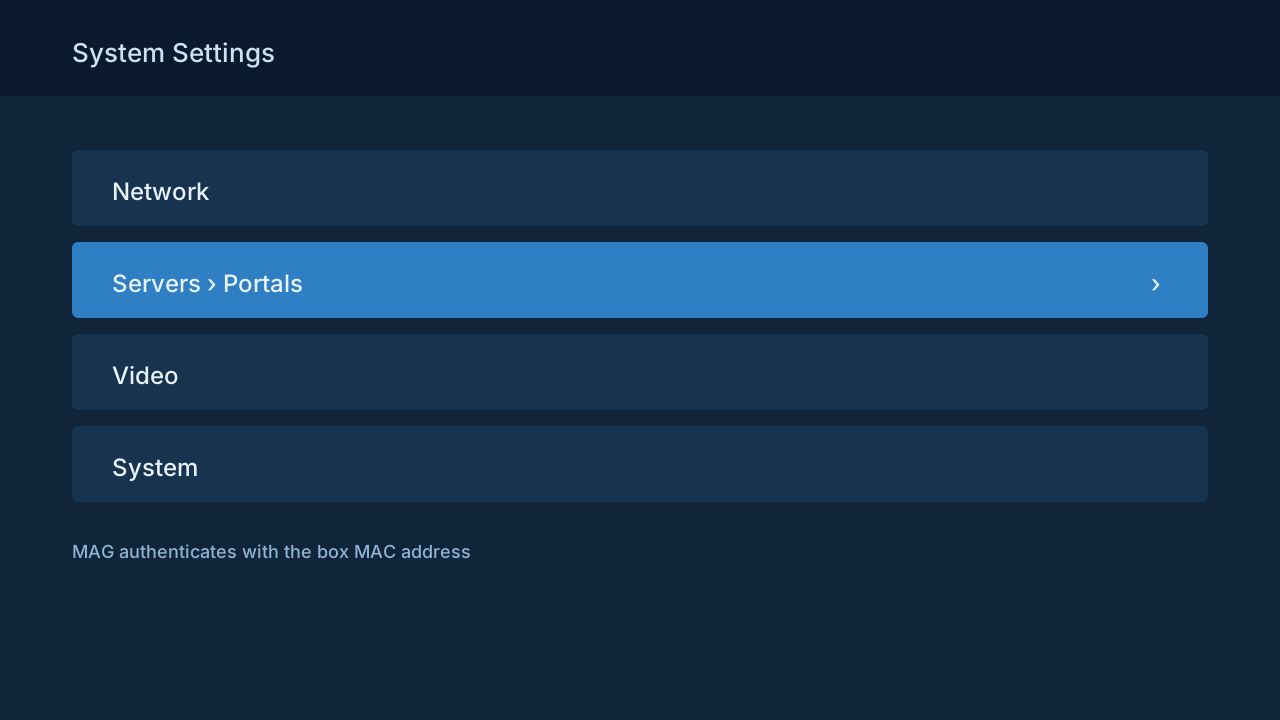
Illustration of the MAG system settings with Servers and Portals highlighted - 3
MAG - enter the portal URL and reboot
Name the portal anything, paste the portal URL from your email into the address field exactly, save, and restart the box from the power menu. On boot it contacts the portal, pulls the channel grid and guide, and lands on live TV.
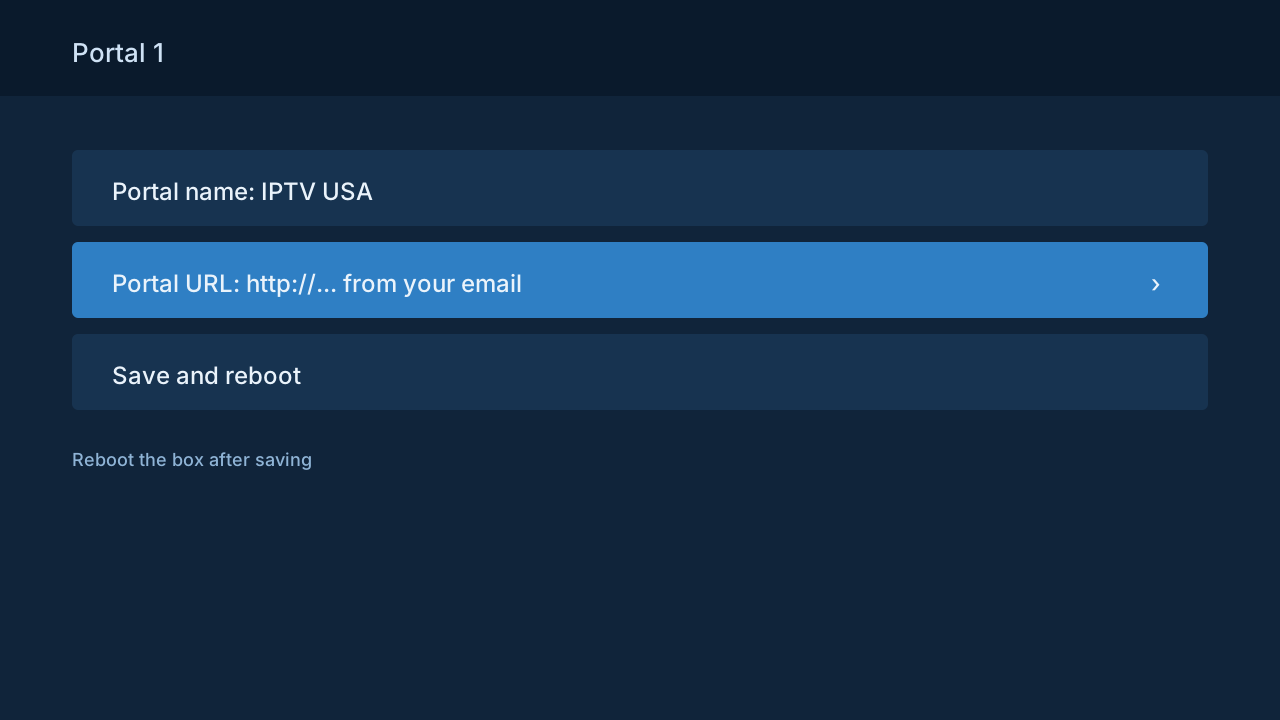
Illustration of the MAG portal URL entry screen - 4
Windows and Mac - install VLC
Download VLC from videolan.org - free, open source, no bundled extras. Mac users who want something more native can use IINA, which reads the same playlists; the steps below are identical apart from menu names.
- 5
Desktop - open the network stream
In VLC choose Media, then Open Network Stream - File, then Open Network on Mac - paste your M3U URL, and press Play. The full channel list loads into VLC's playlist panel, and double-clicking any entry tunes it.
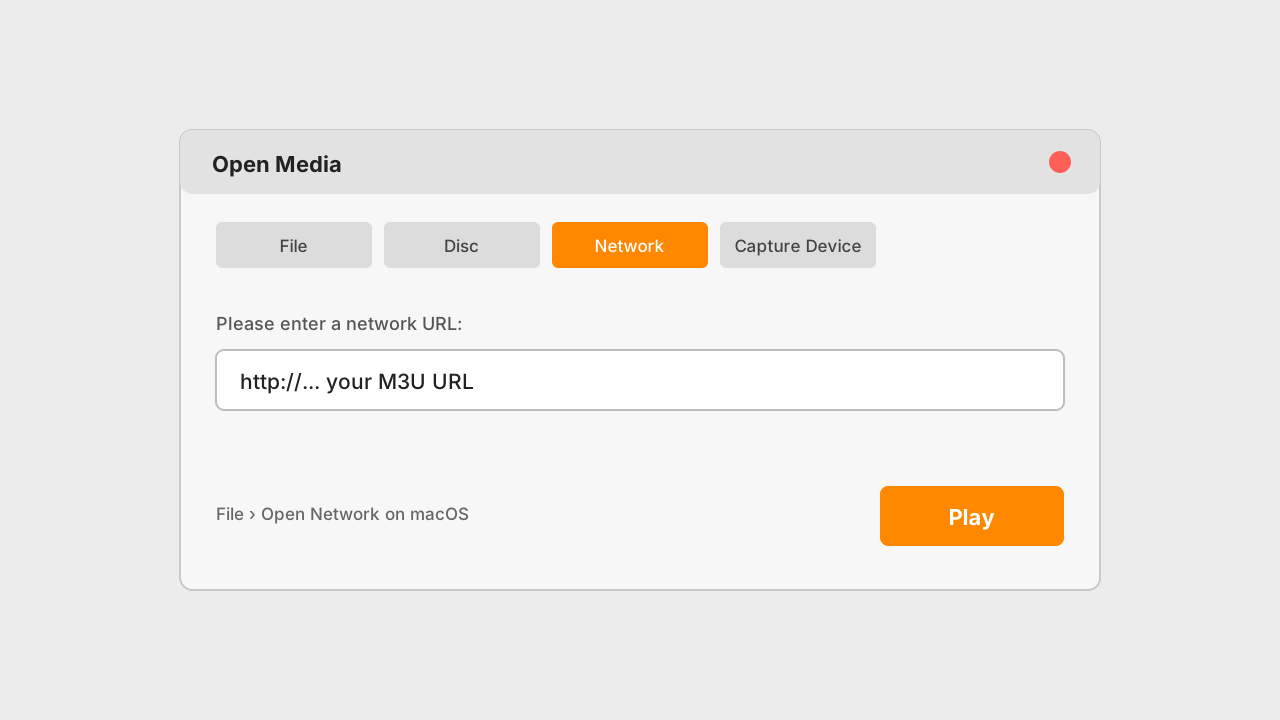
Illustration of VLC's Open Network Stream dialog with the M3U URL pasted - 6
Desktop - save it for next time
Save the playlist as a favourite or let it sit in VLC's recent media so next launch is one click. VLC has no programme guide - for a real EPG on desktop, a dedicated IPTV player is the nicer daily driver; VLC is the fallback that always works.
MAG models and the desktop alternatives
| Hardware | Auth method | Guide quality | Verdict |
|---|---|---|---|
| MAG 522 / 524 | MAC + portal | Full EPG, cable-like | Current models, 4K capable |
| MAG 420 / 424 | MAC + portal | Full EPG | Fine for HD and 4K households |
| MAG 322 / 324 | MAC + portal | Full EPG | Ageing but dependable at 1080p |
| VLC on desktop | M3U URL | No guide | Instant, universal, spartan |
| IINA on Mac | M3U URL | No guide | Nicer VLC for macOS users |
Tips that save time
MAG remotes map like cable
Channel up and down, direct number entry, and the EPG button behave exactly as on a cable box - which is why MAG remains the pick for households that do not want to learn an app. Configure it once, hand over the remote, field no questions.
Desktop is the travel option
A laptop plus the M3U URL is a hotel-room TV anywhere with workable Wi-Fi, and it only counts against your screens while a stream actually plays. VLC needs no admin rights on most machines, which helps on work laptops.
Keep the second portal slot empty
MAG firmware offers two portal slots, and a stray old entry in slot 2 causes mysterious boot delays while the box polls a dead server. One active portal, one empty slot is the clean configuration.
Common mistakes to avoid
Skipping the MAC registration
A perfect portal URL with an unregistered MAC loads an empty grid - the box is authenticating with hardware you have not told us about yet. Send the address first; everything else in the MAG section depends on it.
Misreading the sticker
The MAC is hexadecimal: a B and an 8, a 0 and an O sit millimetres apart on a small sticker. Photograph it and paste from the photo into chat rather than transcribing by eye - the classic MAG support ticket is one wrong character.
Typing the portal URL from memory
Portal URLs carry paths and ports that must match exactly. Copy from the email; a dropped /c/ at the end is invisible on the box's screen and fatal to the connection.
Expecting an EPG in VLC
VLC plays the streams and stops there - no guide, no logos, no catch-up. That is the trade for universality. Wanting a grid on desktop means a dedicated IPTV player, not more VLC settings.
If something isn't working
MAG loads the portal but shows no channels
+
That is the MAC not registered yet, or one character of it misread. Confirm the address you sent against the sticker - photograph it to be sure - and allow a few minutes after registration before rebooting again.
The portal URL is rejected after a firmware update
+
Some MAG firmware updates clear portal entries. Re-enter the URL from your email; if the box then loops on boot, hold the menu key on power-up to reach the recovery portal screen and correct it there.
VLC opens the playlist but stutters
+
Raise the network cache: Preferences, Show All, Input / Codecs, Network caching - set 2000 ms. Desktop Wi-Fi adapters are often the weakest link in the house - check with Fast.com - and a USB Ethernet adapter transforms laptop streaming.
VLC shows the list but a channel will not open
+
Try another channel first - one dead entry means that feed, not your setup. If nothing opens, the URL lost a character in the paste; re-copy from the email and watch for the port number.
The MAG boots to a black screen
+
Unplug for thirty seconds and boot with the remote in hand. Persisting black screens after a portal change usually mean a typo in the URL - the recovery portal screen (menu key at power-on) lets you fix it without a reset.
Not listed? The setup hub covers the five most common problems across all devices, and support will walk it through with you live.
MAG / PC questions, answered
Which MAG boxes are supported?
+
Current Infomir models work, including the 322, 324, 420, 424, 522 and 524 series. The box authenticates by MAC address, so registering that address with support is the one extra step compared with app-based devices - after that, it runs like cable.
Why does MAG use a portal instead of an M3U URL?
+
MAG firmware is built around the stalker portal system: the portal serves the channel grid, guide and updates as one integrated service, which is exactly what makes the box feel like a cable box. Same subscription either way - only the delivery format differs.
Where do I find the MAC address?
+
On the barcode sticker underneath the box, formatted like 00:1A:79:xx:xx:xx, and also on-screen under Settings, Device Info. Photograph the sticker and paste from the photo when sending it to support - hex characters are easy to misread by eye.
Is VLC good enough for daily viewing?
+
As a second screen, yes - it is free, universal, and plays everything. It has no programme guide though, so for a main TV a dedicated IPTV player with a real EPG is the nicer daily driver. VLC is the fallback that works on any machine you sit down at.
Can I run the MAG and a desktop at the same time?
+
Yes, provided your plan's simultaneous-screen count covers both - a MAG in the living room and a laptop in the office playing at once is two screens. Idle devices cost nothing; only active streams count.
Does the MAG need a VPN?
+
No. The box streams from US infrastructure directly, and MAG firmware has no native VPN support anyway - adding one means router-level configuration that usually slows things down. Registration plus portal URL is the whole setup.
My MAG is second-hand - does that matter?
+
Only pleasantly: confirm the previous owner's portal entries are cleared (both slots), then register its MAC as normal. If the box was locked to another provider's firmware, the recovery portal screen at boot lets you replace the portal without any flashing.
Is there a real guide on Windows, like on the MAG?
+
Not in VLC. Dedicated Windows IPTV players add a proper EPG grid over the same M3U URL, and they are the answer if the desktop is a main screen. For occasional use, VLC plus the channel list covers it.
More general questions - legality, pricing, channels - live on the main FAQ.